Static Website Hosting on AWS: Serverless, Fast, and Cheap
Most blogs and documentation sites don't need a server. Yet many people reach for a VPS, a container, or a managed platform — paying for compute that spends 99% of its time idle.
This site runs on a fully serverless stack: S3 + CloudFront + Route53, deployed automatically via GitHub Actions. No EC2. No containers. No idle cost. Here's how it's built and why it works.
Summary
| Property | This stack |
|---|---|
| Servers to manage | 0 |
| Latency (cached) | < 10ms from edge |
| Latency (origin) | 50–150ms (cache miss only) |
| Monthly cost | ~$0.60 |
| Deployment time | < 2 minutes |
| Scales to zero | Yes |
| Credentials to manage | None (OIDC) |
Source code and Terraform for this setup is available on GitHub.
Architecture Overview
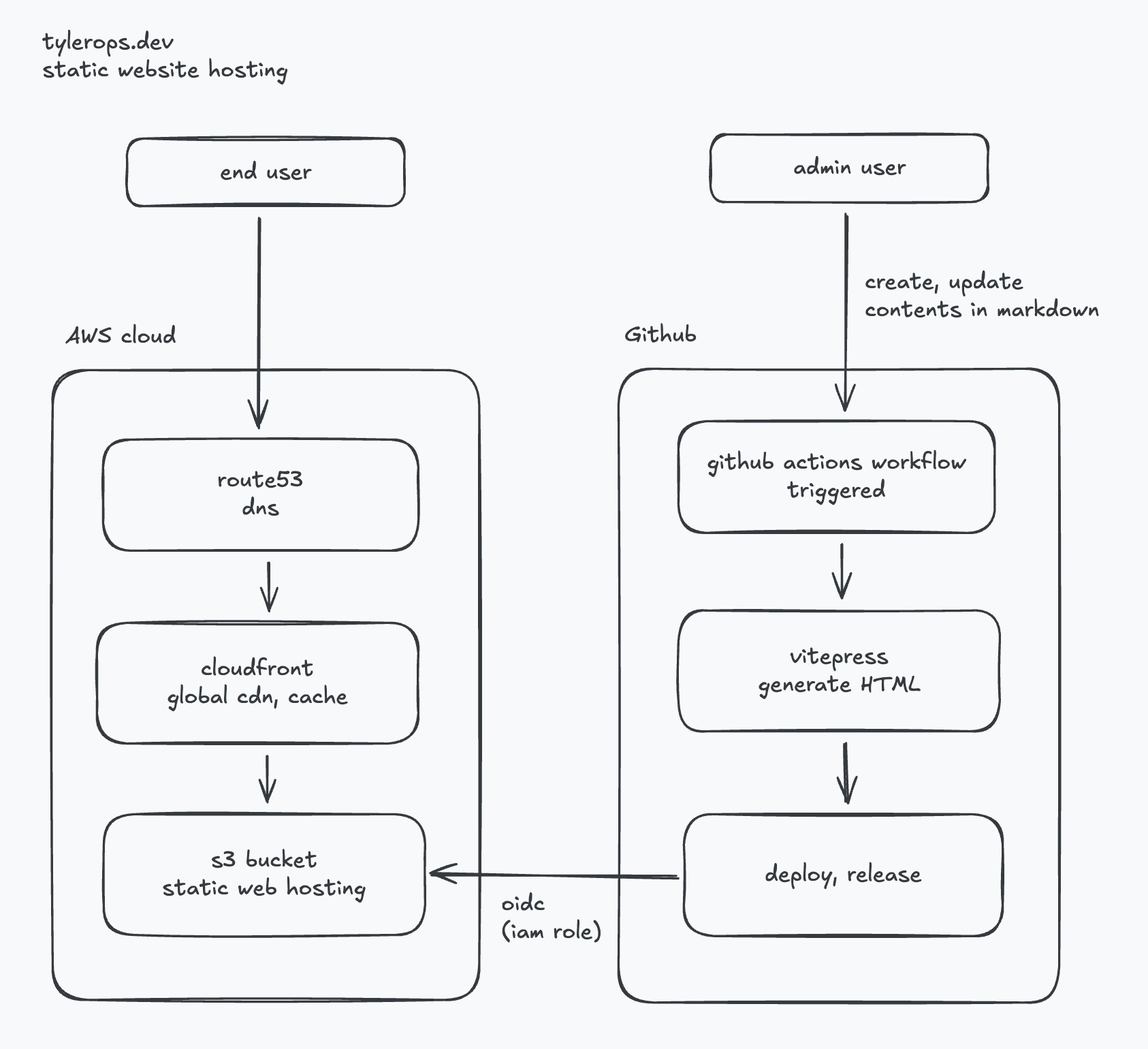
Two separate concerns: content delivery (left) and deployment pipeline (right). They only touch at S3.
Cost Breakdown
For a low-to-medium traffic blog, the monthly cost is effectively cents.
| Service | Pricing | Estimated monthly |
|---|---|---|
| S3 storage | $0.023/GB | < $0.01 (static files are tiny) |
| S3 requests | $0.0004/1k GET | < $0.01 |
| CloudFront transfer | $0.0085/GB (first 10TB) | $0.01–$0.10 |
| CloudFront requests | $0.0075/10k HTTPS | $0.01–$0.05 |
| Route53 hosted zone | $0.50/zone/month | $0.50 |
| GitHub Actions | Free for public repos | $0.00 |
| Total | ~$0.60/month |
Compare that to:
- A $5/month VPS — idle compute you're paying for whether or not anyone visits
- A managed platform (Vercel, Netlify free tier) — vendor lock-in, rate limits, or paywalls at scale
The only fixed cost here is the Route53 hosted zone at $0.50/month. Everything else scales with actual usage.
Why Serverless
A traditional web server model means:
- An EC2 instance running 24/7 to serve files that rarely change
- SSH access to manage, patch, and monitor it
- A fixed monthly cost regardless of traffic
With S3 + CloudFront:
- No instance to manage — no patching, no SSH, no uptime monitoring
- Scales to zero — when there's no traffic, there's no cost
- Scales to any load — CloudFront handles traffic spikes without configuration changes
- High availability by default — S3 is 99.999999999% durable, CloudFront runs across hundreds of edge locations
The infrastructure is defined in Terraform and lives in the repo. No manual console clicks, no configuration drift.
Latency: CloudFront Edge
The biggest latency win with this setup is CloudFront's edge network.
Without a CDN, every request travels to the S3 origin region (e.g., ap-southeast-1). A user in Europe or the US adds 150–300ms of round-trip latency just from geography.
With CloudFront:
- Requests are served from the nearest of 600+ global Points of Presence (PoPs)
- Cached responses are served in < 10ms from edge
- Only cache misses hit the S3 origin
Cache behavior
Static sites are ideal for aggressive caching. HTML files can be cached for minutes, assets (JS, CSS, images) for days or longer:
Cache-Control: max-age=31536000, immutable   # hashed assets (e.g. app.abc123.js)
Cache-Control: max-age=300, must-revalidate # index.html, *.html pagesWith VitePress, JS/CSS filenames are content-hashed on build — meaning they never change unless the content changes. This allows indefinite caching of assets with zero stale-content risk.
CloudFront invalidation on deploy
After each deploy, the GitHub Actions workflow flushes the CloudFront cache for /*. This ensures HTML pages reflect new content within seconds, while long-cached assets (with new hashed filenames) remain valid.
aws cloudfront create-invalidation \
  --distribution-id $CF_DISTRIBUTION_ID \
--paths "/*"Without this step, users could see stale HTML pointing to old JS/CSS hashes — or the old version of a post entirely.
CI/CD: GitHub Actions + OIDC
Deployment is triggered automatically on every push to main that touches docs/**.
on:
  push:
    branches: [main]
paths: ['docs/**']OIDC — no long-lived credentials
Instead of storing an AWS access key as a GitHub secret, the workflow authenticates using OIDC. GitHub acts as an identity provider; AWS trusts tokens issued by GitHub and maps them to an IAM Role.
- name: Configure AWS credentials
  uses: aws-actions/configure-aws-credentials@v4
  with:
    role-to-assume: arn:aws:iam::${{ secrets.AWS_ACCOUNT_ID }}:role/github-actions-deploy
aws-region: ap-southeast-1The IAM Role has a trust policy that only allows tokens from the specific repo and branch:
{
  "Condition": {
    "StringEquals": {
      "token.actions.githubusercontent.com:sub": "repo:tyler0ps/tylerops.dev:ref:refs/heads/main"
    }
  }
}No credentials to rotate. No secrets to leak. The role can only be assumed by this exact workflow.
Full deploy pipeline
push to main (docs/**)
  → GitHub Actions triggered
  → npm run build          (VitePress → static HTML/JS/CSS)
  → aws s3 sync            (upload changed files to S3)
→ CloudFront invalidation (flush cache)End-to-end deploy time is typically under 2 minutes.
Trade-offs
This setup works well for static content but has real limits:
- No server-side logic — no auth, no API routes, no database queries at the CDN layer
- Dynamic features need external services — contact forms, search, and comments require third-party integrations or a separate API
- Build step required — content changes go through a full CI/CD cycle, not instant like a CMS
For a blog or documentation site, none of these are blockers. For anything with user-generated content or real-time data, you'd need a different stack.
Static hosting on S3 + CloudFront isn't new, but it's still one of the best options for sites that don't need a server. The infrastructure is simple, the cost is negligible, and the performance is hard to beat.